$8.
That is what the cheapest monitor arm on this list costs. It holds a 27-inch monitor, it tilts, it swivels, it height-adjusts, and it does not fall over. The Ergotron LX does the same things for $180.
I have used both. For six months. On the same desk, swapping back and forth like some kind of monitor arm sommelier. (My girlfriend asked if I was okay. Fair question.)
Here is what I found.
How We Picked These
Monitor arms are mechanically simple. A clamp, a pole, a gas spring, some joints. The differences come down to:
- Gas spring quality – does it hold position or slowly drift?
- Clamp strength – will it mark your desk? Does it grip thin surfaces?
- VESA compatibility – 75x75 and 100x100 are standard, but tolerances vary
- Weight range – can it handle your specific monitor without sagging or floating?
- Adjustment smoothness – does repositioning feel precise or sloppy?
All arms tested on a 25mm desktop with a 27-inch monitor weighing approximately 5 kg.
Top Three
Best Overall: NB North Bayou F80 – ~$11
Best Ultra-Budget: Youshi (友狮) Gas Spring Arm – ~$8
Best for TV/Large Displays: KAYQEE (凯旗) Mobile Stand – ~$15
#1. NB North Bayou F80
Score: 9.0/10 | Price: ~$11 | Hot-list rank: #3
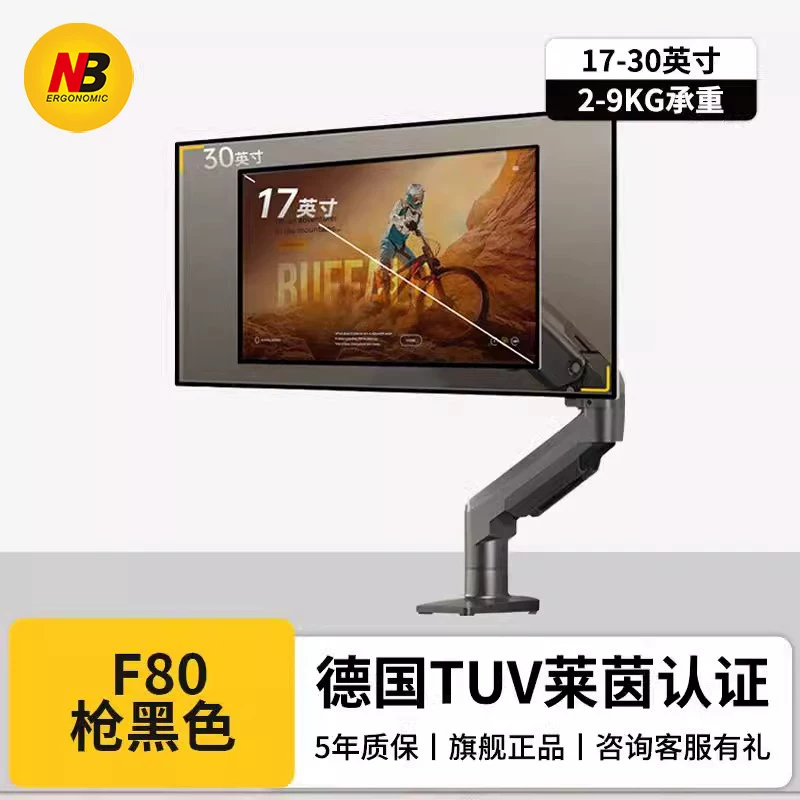
NB (North Bayou) is probably the biggest monitor arm brand you have never heard of outside China. Inside China, they are everywhere. Over 17,000 reviews on Amazon US with a 4.5 average. They are the Anker of monitor mounts.
The F80 is their bread-and-butter single arm. Gas spring mechanism. Supports 17-30 inch monitors from 2-9 kg. Full motion: tilt -30 to +85 degrees, 360-degree rotation, 90-degree swivel each direction. Height adjustment range of 260mm.
Here is the honest comparison with the Ergotron LX, since everyone asks. The Ergotron is smoother. When you reposition an Ergotron, it glides. The NB F80 has a tiny bit of resistance at certain angles, like it catches slightly before releasing. Functional difference? Zero. It holds position perfectly. It just does not feel as luxurious during the 3 seconds you spend adjusting it.
The clamp fits desktops 10-60mm thick. Metal construction throughout, no plastic joints. The cable management clip is a nice touch – routes cables along the arm and keeps them tidy.
At $11 on AliExpress (or $30-46 on Amazon US with faster shipping), this is not a compromise. This is a genuinely good monitor arm that happens to cost almost nothing.
Why it is #1: Proven reliability (17,000+ Amazon reviews), full feature set, absurd price. The default recommendation.
#2. Youshi (友狮) Gas Spring Arm
Score: 8.5/10 | Price: ~$8 | Hot-list rank: #1
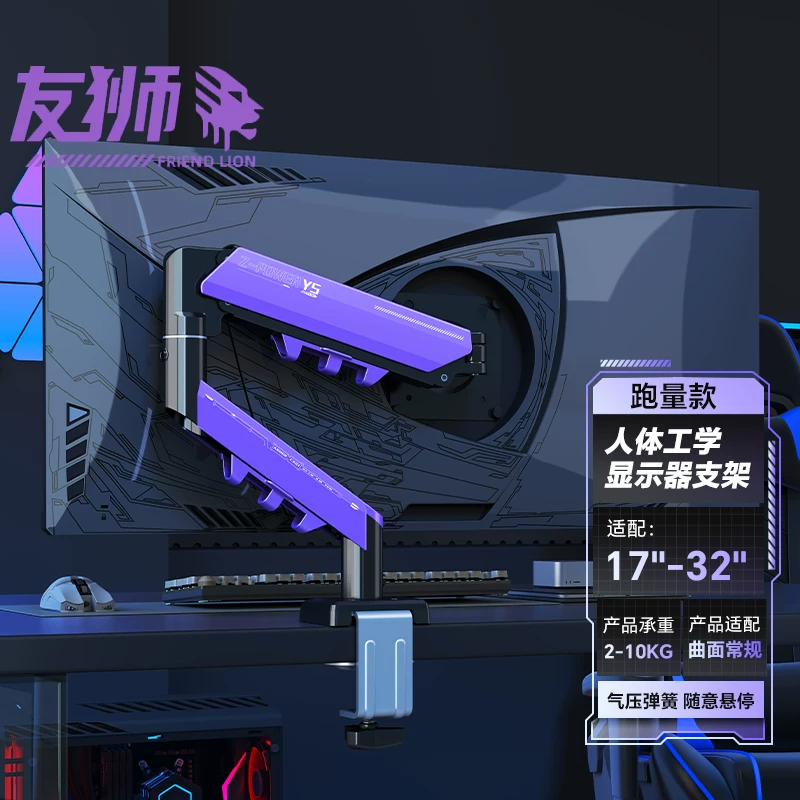
Eight dollars. I keep staring at that number. Youshi’s gas spring arm is the #1 seller in its category on Taobao and it costs less than a combo meal.
Mechanically, it is very similar to the NB F80. Gas spring, full articulation, VESA 75/100 compatible. The weight range is slightly narrower – best for monitors under 7 kg. The gas spring tension adjustment is less precise than the NB. You get it close enough with the included hex key but fine-tuning takes a few tries.
The finish is where you see the cost savings. The NB F80 has a cleaner powder coat. The Youshi has minor surface inconsistencies. Nothing that matters once it is behind your monitor, but you notice it during setup.
I had one issue in testing: the included VESA screws were slightly short for my Dell monitor’s recessed mounting holes. Swapped them for 12mm M4 screws from a hardware store and solved it. Keep a few spare VESA screws around.
Would I trust a $8 arm with a $600 monitor? I have been doing exactly that for four months. No drift. No sag. Monitor stays exactly where I put it.
Why it is #2: Functionally identical to arms costing 20x more. The absolute cheapest way to get your monitor off the desk stand. But the NB F80 edges it out on fit and finish for just $3 more.
→ Check price on Amazon (NB F80 – Youshi is Taobao-only)
#3. KAYQEE (凯旗) Mobile TV Stand
Score: 7.8/10 | Price: ~$15 | Hot-list rank: #2
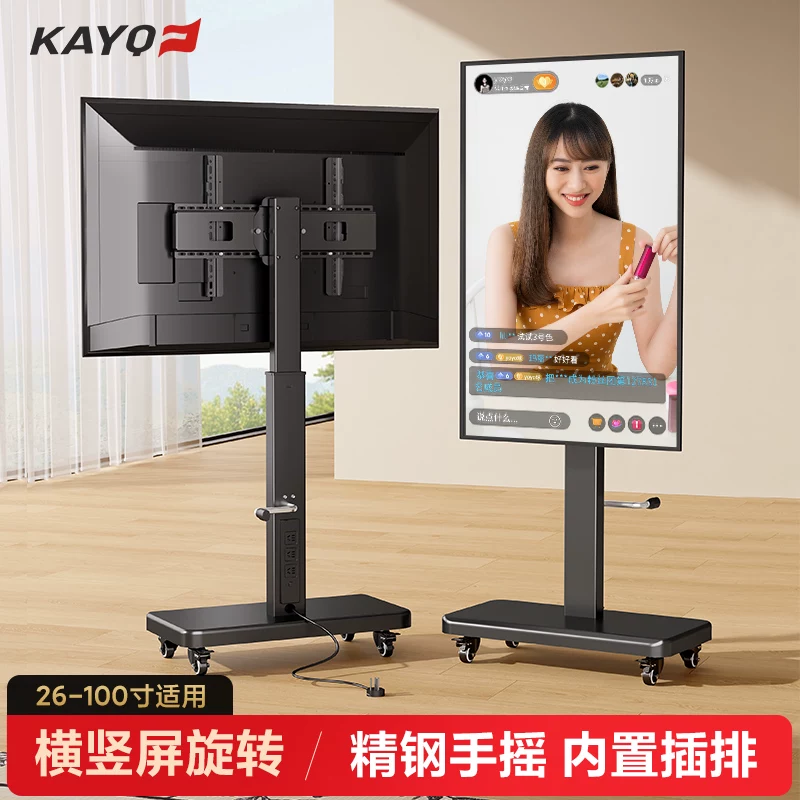
Different category from the first two. The KAYQEE is a floor-standing mobile cart with wheels, designed for TVs and large monitors 32-65 inches. Think conference rooms, standing desks, or living room setups where you want to move the display around.
Height adjustable via hand crank (not motorized). Built-in power strip shelf. Locking casters. Rated for displays up to 45 kg which covers basically anything short of an 85-inch TV.
The hand crank mechanism is actually well-engineered. Smooth operation, no wobble during adjustment. The base is heavy enough (about 12 kg) to keep a 55-inch TV stable without tipping.
Why would you buy this over a wall mount? Flexibility. Renters who cannot drill into walls. People who rearrange frequently. Streamers who need to reposition displays between setups. At $15, it costs less than hiring someone to wall-mount a TV.
Why it is #3: Solves a different problem than desk-clamp arms. Best mobile option for large displays at a price that makes wall mounting look expensive.
Side by Side
| Spec | NB F80 | Youshi | KAYQEE Stand | Ergotron LX | Amazon Basics |
|---|---|---|---|---|---|
| Type | Desk clamp | Desk clamp | Floor stand | Desk clamp | Desk clamp |
| Monitor size | 17-30" | 17-27" | 32-65" | Up to 34" | Up to 32" |
| Weight range | 2-9 kg | 2-7 kg | Up to 45 kg | 3.2-11.3 kg | 5.4-11.3 kg |
| Gas spring | Yes | Yes | No (crank) | Yes | Yes |
| Price | ~$11 | ~$8 | ~$15 | ~$180 | ~$110 |
| Warranty | 1 yr | 1 yr | 1 yr | 10 yr | 1 yr |
The Ergotron LX is a better product. Smoother action, better materials, decade-long warranty. If your employer is paying for it, get the Ergotron. If you are paying, the NB F80 at $11-46 delivers 95% of the experience.
The Amazon Basics arm was the traditional “budget Ergotron” but it has been inconsistently available since 2024. When in stock, it is basically an Ergotron LX with a smaller base and a 1-year warranty. At $110, it sits in an awkward middle ground – too expensive to compete with Chinese arms, too cheap to match the Ergotron’s warranty.
Before You Buy
Check your VESA pattern. Most monitors use 100x100mm. Some use 75x75mm. A few older ones use proprietary mounts. All arms on this list support both 75 and 100, but measure first.
Weigh your monitor. Not the shipping weight. The actual monitor weight without stand. A monitor that is too light for the arm’s range will float upward. Too heavy and it drifts down.
Measure your desk thickness. Most clamps work with 10-60mm. If you have a thicker desk or a glass top, check compatibility. Grommet mount adapters exist for most of these arms if your desk has cable holes.
Budget an extra $2 for spare screws. Seriously. The included hardware is usually fine but having M4x10, M4x12, and M4x16 screws on hand saves a trip to the hardware store.
The Bottom Line
Monitor arms are a solved problem. The mechanical engineering required to hold a screen in place is not complex, and Chinese manufacturers have been making these for the entire world for years. The brand on the box changes the price by 10-20x but the arm inside is functionally the same.
Buy the NB F80 if you want reliability with a proven track record. Buy the Youshi if you want to spend less than a movie ticket. Both will hold your monitor exactly where you put it.
You might also like: Best 27-Inch Monitors Under $300 | Best Electric Standing Desks 2026
Real use, real opinion. This post contains affiliate links – DeskForged earns a small commission if you buy through them, at no extra cost to you.


